Choose the material
Upload a PDF or choose any compatible Resource already in one of your Projects.
ReadFaster
ReadFaster follows your goal through research papers, PDFs, notes, code, datasets, and other Project Resources—while keeping the original material beside the summary.
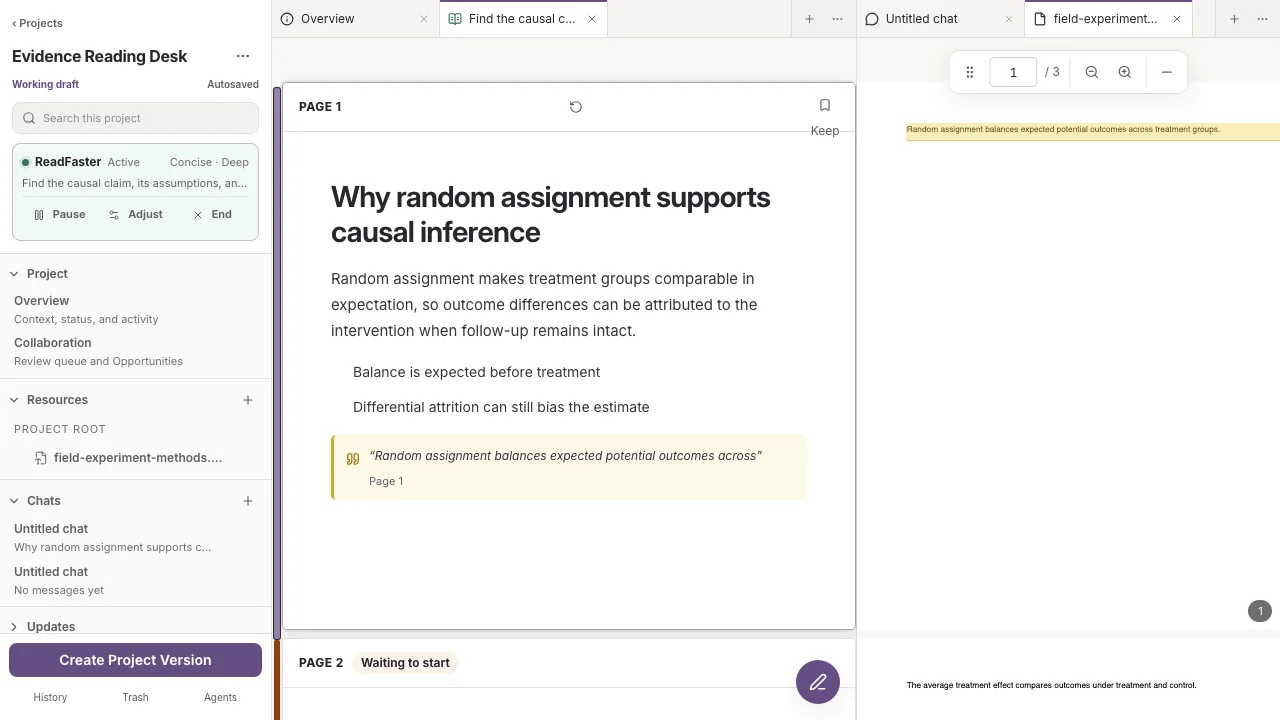
A real paired reading workspace. The page summary, evidence quote, and highlighted original remain visible together.
A reading lane
Choose concise, technical, explanatory, critical, or custom language and control the detail and format.
Upload a PDF or choose any compatible Resource already in one of your Projects.
Tell ReadFaster what you need to understand, compare, extract, or question.
PDF pages and summary cards stay aligned as you move through the document.
Supporting quotes retain exact Resource locations so the original remains one click away.
Reading boundaries
ReadFaster keeps the source available because model summaries can omit, flatten, or misread important details.
Your reading goal, position, summaries, and uploaded working Resource remain private.
Evidence points to the page, section, rows, or lines where the supporting material appears.
Pause, change the next summaries in natural language, regenerate, or ask for the material through your current position.
Bring a document